
Connecting Zoho Books
Zoho Books is connected through OAuth, which means FiscoBridge securely links to your Zoho account without you needing to share credentials. Once connected, your Zoho Books invoices are automatically synced and fiscalized.
Setting Up the Connection
Go to Integrations → Integrations in the sidebar
Click Create Integration
On the New Integration page, select the Zoho Books card

An Upload Certificate dialog opens — select your PFX certificate file and enter its password, then click Upload
After the certificate is uploaded, the Zoho Books configuration dialog opens
You'll be redirected to Zoho's authorization page
Log in to your Zoho account (if not already logged in)
Select the organization you want to connect
Allow FiscoBridge access
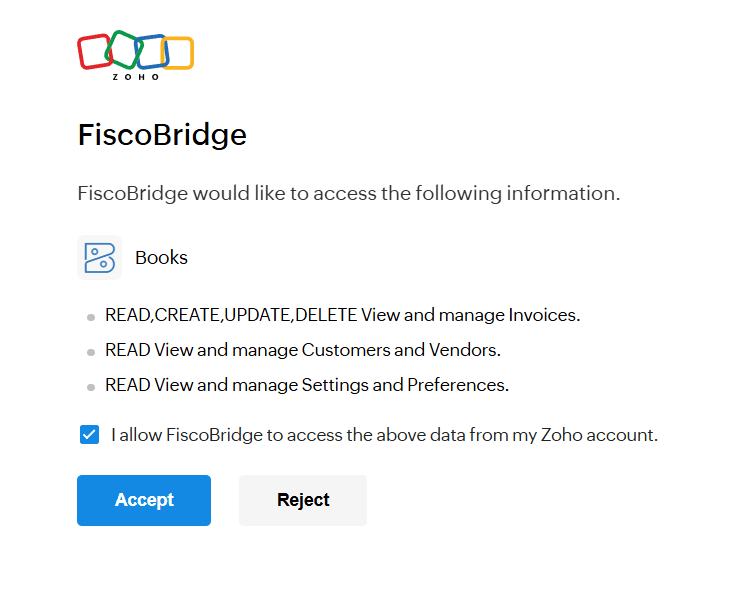
You'll be redirected back to the Client Portal
Once authorized, the Zoho Books integration appears in your integrations list with status Active.

Webhook Setup (Optional)
For real-time invoice notifications, you can configure a webhook in your Zoho Books account. When a Zoho Books integration is active, the Integrations page shows a Zoho Books Webhook Setup panel with instructions:
Copy the webhook URL shown in the panel:
https://api.fiscobridge.com/webhook/zohoIn Zoho Books, go to Settings → Automation → Workflow Rules
Create a new rule for the Invoice module, triggered on Create and Edit
Add a Webhook action with the URL above and POST method
Select Default payload format (JSON with all fields)
Enable I want to secure this webhook and enter the secret token provided by your administrator
Note: Without webhook setup, invoices are polled every 15 minutes automatically.
How It Works
Invoices in your Zoho Books account are synced to FiscoBridge
Each invoice is automatically signed with your fiscal certificate and reported to the tax authority
Sync happens automatically — no manual export or import needed
Reconnecting
If the OAuth connection expires or is interrupted:
Go to Integrations → Integrations
Find your Zoho Books integration
Click the Reconnect button
Complete the Zoho authorization again
Note: Zoho OAuth tokens can expire. If your integration shows as inactive, reconnecting will restore the sync.
Removing the Integration
Go to Integrations → Integrations
Click Remove next to the Zoho Books integration
Confirm the removal

Previously fiscalized invoices are not affected.
Troubleshooting
Sync issues?
Check that the integration status is Active
Try reconnecting if the status shows as inactive
Ensure your integration license is active and within its invoice limit
Delayed invoices?
If you haven't set up the webhook, invoices are polled every 15 minutes
With the webhook configured, invoices sync in near real-time
Sync frequency also depends on your integration tier — Growth and Scale tiers offer faster processing
Next Steps
Manage integrations — View all your connections
Integrations Overview — Explore other supported platforms