
Cloud POS Overview
Cloud POS is a browser-based Point of Sale system that lets you issue fiscally signed invoices from any device — no software installation required. Just open your browser, upload your certificate, and start issuing invoices.
What is Cloud POS?
Cloud POS is a complete POS system that runs entirely in your web browser. It handles:
Invoice creation — Add items, select payment type, and fiscalize in a few clicks
Fiscal signing — Every invoice is digitally signed using your PFX certificate
Reporting — Invoices are automatically reported to the tax authority
History — Full invoice history with search, filtering, and receipt printing
Key Features
No installation — Works in any modern web browser (Chrome, Firefox, Safari, Edge)
Any device — Use it on a laptop, tablet, or phone
Secure — Your PFX certificate is used for signing; data is encrypted in transit
Real-time — Invoices are fiscalized immediately
Multi-location — Support for multiple taxpayers and locations
Offline-aware — Graceful handling if connectivity is temporarily lost
How It Works
Upload your PFX certificate — Issued by your tax authority (e.g., FRCS in Fiji)
Open Cloud POS — Navigate to the Create Invoice page in the Client Portal
Issue invoices — Add items, choose payment type, and fiscalize

Each invoice gets a unique invoice number, a QR code, and a verification URL that anyone can use to confirm it's authentic.
Who Is It For?
Cloud POS is ideal if you:
Don't have an existing POS system and need a simple way to issue fiscal invoices
Want a portable solution you can use from any device
Need a backup POS in case your primary system goes down
Operate in multiple locations and want a centralized system
Technical Specifications
POS Type
Cloud POS is a computerized Point of Sale system (POS) delivered as a cloud-based web application. It is not a hardware device — it is software accessed through a standard web browser.
Installation
Cloud POS is installed and accessed via the Internet (cloud service). There is no software to download or install on your local device. Simply sign in to the Client Portal at your region's URL and begin using the POS.
Supported Operating Systems
Because Cloud POS runs in a web browser, it works on any operating system with a modern browser:
Operating System | Supported |
|---|---|
Windows | Yes |
macOS | Yes |
Linux | Yes |
Android | Yes |
iOS | Yes |
Any device that can run a modern web browser (Chrome, Firefox, Safari, Edge) can use Cloud POS.
Supported SDC Types
Cloud POS communicates with a Virtual SDC (V-SDC) using a digital certificate in PFX file format. The PFX certificate is uploaded to the portal and used for mutual authentication and invoice signing.
SDC Type | Supported |
|---|---|
V-SDC using digital certificate in file format | Yes |
Connection to SDC
Cloud POS connects to the V-SDC over the Internet using HTTPS protocol, as documented in the Technical Instructions for EFD Suppliers. The connection is secured with TLS encryption.
Peripheral Devices
Cloud POS runs in a standard web browser and does not directly interface with peripheral hardware. If the host device is connected to peripherals such as a barcode reader, scale, receipt printer, or cash drawer, those devices interact with the operating system (e.g., a barcode reader acts as a keyboard input) and do not interfere with the standard fiscal POS operations. Invoice creation, fiscal signing, SDC communication, and reporting continue to function exactly as documented regardless of any peripherals attached to the host device.
Product Information
Field | Value |
|---|---|
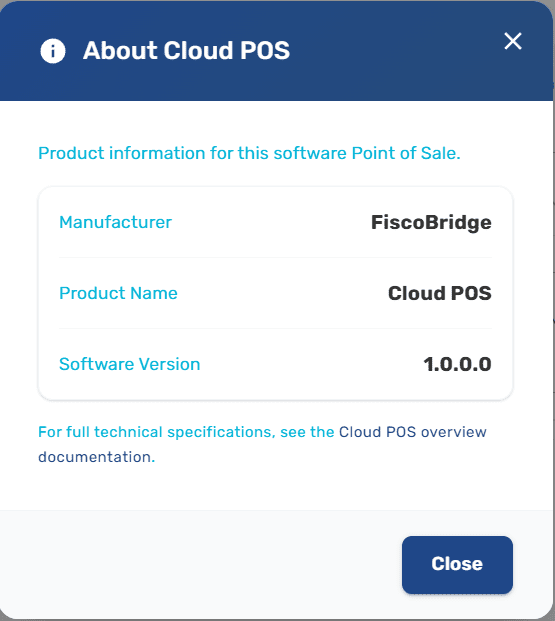
Manufacturer | FiscoBridge |
Product Name | Cloud POS |
Software Version | 1.0.0.0 |
This information is also accessible directly inside the application. On the Create Invoice page in the Client Portal, click the About link next to the page title to open the Product Information dialog. The dialog displays the manufacturer, product name, and the current software version at any time.
Supported Regions
Cloud POS is certified for use in:
Fiji
Samoa
Vanuatu
Next Steps
POS Manager — Upload your PFX certificate to get started
Create an invoice — Issue your first fiscal invoice
Manage invoices — View, search, and filter your invoice history
Product management — Set up your product catalog
Tax rates — Understand how tax rates work
Invoice types — Learn about all supported invoice and transaction types
Payment types — See all supported payment methods
Fiscal compliance — Understand fiscal rules and compliance guarantees